Monday, November 21, 2022

VeryUtils Web Crawler and Image Downloader application is used to collect a multitude of images from more websites.

 VeryUtils Web Crawler and Image Downloader application is used to collect a multitude of images from more websites. The images can be downloaded and saved to a given folder for enhanced processing. VeryUtils Web Crawler and Image Downloader is a PHP script which can find and download all images from web pages. VeryUtils Web Crawler and Image Downloader allows you to download images from given links. Our tool support multi images in a single web page, so you can use it to download all the images from a single web page.


https://veryutils.com/web-crawler-and-image-downloader-for-php

Web crawling (also known as web scraping) has been broadly applied in many fields today. Before a VeryUtils Web Crawler tool ever comes into the public, it is the magic word for normal people with no programming skills. Its high threshold keeps blocking people outside the door of Big Data. A web scraping tool is the automated crawling technology and it bridges the wedge between the mysterious big data and everyone.

There are many benefits of using a web scraping tool. For example, It set your hands free from doing repetitive work of searching, copying, and pasting. Extracted data can be exported into a well-structured format including but not limited to Excel, HTML, and CSV. It saves you time and money from getting a professional data analyst. It is the cure for marketers, sellers, journalists, YouTubers, researchers and many others who are lacking technical skills.

VeryUtils Web Crawler and Image Downloader is written in PHP, it can be used to crawl web pages and download all images automatically, you can also modify it to best meet your requirements.

VeryUtils Web Crawler and Image Downloader is the best image saver application to keep your favourite image files offline in your local system while you are not be able to connect into connection internet. This image downloader has more abilities to save JPG, JPEG, Gif and PNG with high quality HD to share it with your friends or social network. You can download any images without any limitation.

VeryUtils Web Crawler and Image Downloader features:

* Filter based on pixel width and height.

* Filter based on url.

* Bulk download all images in once.

* Select what images you want to download.

* Check the size of each image.

* Supporting all principal websites (Instagram, Facebook, Twitter, ...).

* Readable CLI Output.

* Optional file output for log.

* HTML Parsing to download images from target.

* Support Windows, Mac, Linux systems.

* Batch download JPG, JPEG, PNG, GIF, etc. image files.

* Standalone application, it doesn't depend on any other applications.

* Full PHP Source Code, you can modify it to best meet your requirements.

* Convert relative image path to absolute URLs automatically.

* Php cURL support.

* No database and Instagram API required.

* Optimize the downloading speed to download large image files, for example, it just need a few seconds to download a big image file with 20MB size.

* Download images from twitter, google, Facebook, Instagram, etc. web sites without any limitation.


VeryUtils Spool to PDF Converter Command Line can be used to batch convert from Windows Spool files to PDF and image files.

 VeryUtils Spool to PDF Converter Command Line can be used to batch convert from Windows Spool files to PDF and image files. SPL files are generally created by Windows spooling system in the spool or plotter/printer's directory, such as "C:\Windows\System32\spool\PRINTERS" folder. Spool files are created by Hewlett-Packard plotters and Windows Printers. SPL is a container format, it may contain PCL 5C, PCL 5E, PCL-XL, Postscript, XPS, SPL-EMF, PDF, EPS, ZIMF, etc. formats. VeryUtils Spool to PDF Converter Command Line is a great software to convert these SPL formats to PDF and other formats, so you can reuse these SPL files easily.


With lots of other amazing features up its sleeve, there are hardly any similar SPL Converter on the market that can challenge the VeryUtils Spool to PDF Converter Command Line's ability. What is more it is very much affordable compared most similar solutions. Try its power for yourself now by downloading a free trial version of the software!

https://veryutils.com/spool-to-pdf-converter-command-line

VeryUtils Spool to PDF Converter Command Line highlight features:

* Export original drawing as the source file (thanks to the "True Printing-quality" technology).

* Export multiple SPL files into a single PDF.

* Save your output file as PDF, PDF/A or non-searchable PDF.

* Change image orientation, e.g. rotate, flip etc..

* Customize page layout attributes (margin, font size, orientation, fit-to-page etc.).

* Convert .SPL format file (Print Spooling File) to PDF file.

* Standalone software and doesn't depend on any other software.

* Support Windows 2000/2003/Vista/7/8/10/11 and later systems.

* Set Security or Restriction options for PDF you create, no one can open, edit, print PDF or copy/paste PDF content!

* Convert SPL files to compressed PDF files.

* Monitor "C:\Windows\System32\spool\PRINTERS" folder, convert all incoming SPL files to PDF files automatically.


Input Formats:

* SPL, EMF-SPL, XPS, PCL, PXL (PCL-XL), Postscript, EPS, PRN, PDF


Output Formats:

* PDF, Postscript & PS, EPS, BMP, JPEG, GIF, PNG, TIFF, MNG, ICO, PCX, TGA, WMF, WBMP, JBG, J2K


VeryUtils Spool to PDF Converter Command Line, unlike any other SPL converter or reader, offers high level of security options, such as setting various user permission (read, copy, print, annotate, etc.), password-protection, adding digital signature or watermark. When enabled, it encrypts the output PDF file to your needs.


Convert Spool File to PDF (SPL2PDF) allows you to convert your spooled output to a PDF file. The PDF document can then be emailed or viewed directly with a web browser. The command can be executed from a command line or it can be embedded into your application for batch processing.


VeryUtils Spool to PDF Converter Command Line options:

Product Name: VeryPDF SPL to PDF Converter Command Line

Description: Batch convert spool files (SPL, PRN, XPS, PCL, Postscript, PS, EPS, EMF, PXL, PCL-XL) to PDF files.

Usage: spl2pdf.exe [options] [in-file] [[out-file]]

-width [int] : Set page width to PDF file

-height [int] : Set page height to PDF file

-rotate [int] : Rotate PDF pages, 90, 180, 270

-margin [string] : Set page margin to PDF file

-margin 10 : Set margin to 10pt to left

-margin 10x10 : Set margin to 10pt to left,top

-margin 10x10x10 : Set margin to 10pt to left,top,right

-margin 10x10x10x10: Set margin to 10pt to left,top,right,bottom

-pagelayout [int] : Set page layout that is used when opening the document in Adobe Reader

-pagelayout 0: Use viewer's default settings

-pagelayout 1: SinglePage

-pagelayout 2: OneColumn

-pagelayout 3: TwoColumnLeft

-pagelayout 4: TwoColumnRight

-pagelayout 5: TwoPageLeft

-pagelayout 6: TwoPageRight

-viewpagemode [int] : Set page mode that is used when opening the document in Adobe Reader

-viewpagemode 0: No page mode is applied, default option

-viewpagemode 1: Show outline tree

-viewpagemode 2: Show thumbnails

-viewpagemode 3: Open the document in full-screen mode

-viewpagemode 4: UseOC

-viewpagemode 5: UseAttachments

-vieweropt [int] : Set viewer preferences to Adobe Reader

-vieweropt 1: HideToolBar

-vieweropt 2: HideMenuBar

-vieweropt 4: HideWindowUI

-vieweropt 8: FitWindow

-vieweropt 16: CenterWindow

-vieweropt 32: DisplayDocTitle

-vieweropt 64: Non-FullScreenPageMode, use -viewerval to set more options

-viewerval [int] : Additional values used by -vieweropt 64

-vieweropt 64 -viewerval 1 : UseNone

-vieweropt 64 -viewerval 2 : UseOutlines

-vieweropt 64 -viewerval 4 : UseThumbs

-vieweropt 64 -viewerval 1024: UseOC

-viewerzoom [string] : Set viewer zoom ratio to Adobe Reader

-viewerzoom FitBH: Display pages to fit the width of its bounding box

-viewerzoom FitH : Display pages to fit the width of page

-viewerzoom Fit : Display pages to fit window

-viewerzoom FitV : Display pages to fit height of page

-viewerzoom FitB : Display pages to fit its bounding box entirely

-viewerzoom FitBV: Display pages to fit height of its bounding box

-viewerzoom 25 : Display pages with magnification at 25%%

-viewerzoom 50 : Display pages with magnification at 50%%

-viewerzoom 1600 : Display pages with magnification at 1600%%

-viewpage [string] : set start page when opening it in Adobe Reader

-pdfver [string] : Set 'version number' to PDF file

-pdfver 0: Generate PDF 1.0 file

-pdfver 1: Generate PDF 1.1 file

-pdfver 2: Generate PDF 1.2 file

-pdfver 3: Generate PDF 1.3 file

-pdfver 4: Generate PDF 1.4 file

-pdfver 5: Generate PDF 1.5 file

-pdfver 6: Generate PDF 1.6 file

-pdfver 7: Generate PDF 1.7 file

-pdfver 8: Generate PDF 1.8 file

-pdfver 9: Generate PDF 1.9 file

-pdfver 10: Generate PDF/X-1a:2001 file

-pdfver 11: Generate PDF/X-1a:2002 file

-pdfver 12: Generate PDF/X-3:2002 file

-pdfver 13: Generate PDF/X-3:2003 file

-pdfver 14: Generate PDF/A-1b 2005 file

-producer [string] : Set 'producer' to PDF file

-creator [string] : Set 'creator' to PDF file

-subject [string] : Set 'subject' to PDF file

-title [string] : Set 'title' to PDF file

-author [string] : Set 'author' to PDF file

-keywords [string] : Set 'keywords' to PDF file

-openpwd [string] : Set 'open password' to PDF file

-ownerpwd [string] : Set 'owner password' to PDF file

-keylen [int] : Key length (40 or 128 bit)

-keylen 0: 40 bit RC4 encryption (Acrobat 3 or higher)

-keylen 1: 128 bit RC4 encryption (Acrobat 5 or higher)

-keylen 2: 128 bit RC4 encryption (Acrobat 6 or higher)

-encryption [int] : Restrictions

-encryption 0: Encrypt the file only

-encryption 3900: Deny anything

-encryption 4: Deny printing

-encryption 8: Deny modification of contents

-encryption 16: Deny copying of contents

-encryption 32: No commenting

===128 bit encryption only -] ignored if 40 bit encryption is used

-encryption 256: Deny FillInFormFields

-encryption 512: Deny ExtractObj

-encryption 1024: Deny Assemble

-encryption 2048: Disable high res. printing

-encryption 4096: Do not encrypt metadata

-bookmark [int] : Create bookmark to PDF file

-bookmark 1: Use short filename as bookmarks

-bookmark 2: Use full filename as bookmarks

-bookmark 3: Use short filename without suffix as bookmarks

-unicode : Enable Unicode conversion

-noempty : Delete empty pages from PDF file

-imgquality [int] : set image's quality

-imgbitcount [int] : set color depth for image files, it can be 1, 8, 24

-imgxres [int] : set xresolution for image files, in DPI (default is 150)

-imgyres [int] : set yresolution for image files, in DPI (default is 150)

-imgw [int] : set image width, unit is pixel

-imgwidth [int] : set image width, unit is pixel, same as -w

-imgh [int] : set image height, unit is pixel

-imgheight [int] : set image height, unit is pixel, same as -h

-paperwidth [int] : set paper width to render PDF/PS/EPS files

-paperheight [int] : set paper height to render PDF/PS/EPS files

-multipage : create multi-page TIFF file

-imgcompress [int] : set compression to TIFF format:

-imgcompress 1 : NONE compression

-imgcompress 2 : CCITT modified Huffman RLE

-imgcompress 3 : CCITT Group 3 fax encoding (1d)

-imgcompress 4 : CCITT Group 4 fax encoding

-imgcompress 5 : LZW compression

-imgcompress 6 : OJPEG compression

-imgcompress 7 : JPEG DCT compression

-addsuffix : add _0001 number to the first filename

-optimize-speed-emfspl-only : optimize speed for EMFSPL format only

-SimulateOverprint : Enable Simulate Overprint feature for PDF to Image conversion

-simulate-overprint : Same as -simulate-overprint option

-debug : Output debug message to console

-skip : Skip existing output files, don't overwrite it

-v : Print copyright and version info

-h : Print usage information

-help : Print usage information

--help : Print usage information

-? : Print usage information

-$ [string] : Input registration key


Example:

spl2pdf.exe D:\in.spl D:\out.pdf

spl2pdf.exe D:\in.prn D:\out.pdf

spl2pdf.exe D:\in.eps D:\out.pdf

spl2pdf.exe D:\in.ps D:\out.pdf

spl2pdf.exe D:\in.pcl D:\out.pdf

spl2pdf.exe D:\in.emf D:\out.pdf

spl2pdf.exe D:\in.xps D:\out.pdf

spl2pdf.exe D:\in.pxl D:\out.pdf

spl2pdf.exe D:\*.prn D:\*.pdf

spl2pdf.exe D:\*.spl D:\*.pdf

spl2pdf.exe C:\*.emf C:\*.pdf

spl2pdf.exe D:\*.* D:\*.pdf

spl2pdf.exe -unicode D:\in.emf D:\out.pdf

spl2pdf.exe -margin 100x100x100x100 C:\in.spl C:\out.pdf

spl2pdf.exe -width 612 -height 792 C:\test.emf C:\out.pdf

spl2pdf.exe -width 612 -height 792 C:\in.emf C:\out.pdf

spl2pdf.exe -subject "subject" C:\in.emf C:\out.pdf

spl2pdf.exe -producer producer -creator creator -subject subject -title title -author author -keywords keywords C:\in.spl C:\out.pdf

spl2pdf.exe -openpwd 123 -ownerpwd 456 -keylen 2 -encryption 3900 C:\in.emf C:\out.pdf

spl2pdf.exe -bookmark 3 C:\in.emf C:\out.pdf

spl2pdf.exe D:\in.spl D:\out.jpg

spl2pdf.exe D:\in.spl D:\out.png

spl2pdf.exe D:\in.spl D:\out.bmp

spl2pdf.exe D:\in.spl D:\out.tga

spl2pdf.exe D:\in.spl D:\out.pcx

spl2pdf.exe D:\in.spl D:\out.tif

spl2pdf.exe -imgbitcount 1 D:\in.spl D:\out.tif

spl2pdf.exe -imgxres 600 -imgyres 600 D:\in.spl D:\out.tif

spl2pdf.exe -multipage D:\in.spl D:\out.tif

spl2pdf.exe -multipage -imgcompress 4 -imgbitcount 1 D:\in.spl D:\out.tif

spl2pdf.exe -imgbitcount 1 -imgxres 600 -imgyres 600 D:\in.pcl D:\out.png

spl2pdf.exe -norasteremf D:\in.pcl D:\out.png

spl2pdf.exe -norasteremf D:\in.pcl D:\out.pdf

spl2pdf.exe -SimulateOverprint D:\in.pdf D:\out.tif

spl2pdf.exe -SimulateOverprint -imgwidth 2000 D:\in.pdf D:\out.tif


Sunday, November 20, 2022

VeryUtils HTML5 JavaScript Events Calendar Control is also an Events Schedule and Event Calendar

 VeryUtils HTML5 JavaScript Events Calendar Control is also an Events Schedule and Event Calendar. The VeryUtils HTML5 JavaScript Calendar is a powerful calendar script that may be easily integrated and used with various PHP and JavaScript projects, such as schedulers, event processors etc. VeryUtils HTML5 JavaScript Events Schedule Calendar is a responsive schedule calendar with clean and modern flat interface. It is very easy to use yet gives plenty of features and styling options. You can use it for any kind of schedule or events calendar. There has more layouts for your choice: monthly view, weekly view, list view, daily view, 2/3 weeks view, etc.

https://veryutils.com/html5-javascript-events-calendar-control

VeryUtils HTML5 JavaScript Events Schedule Calendar that is full featured. Now your service just got the customizable calendar.


Event Calendar is a server-side dynamic web application, built with jQuery Full Calendar and integrated onto Bootstrap Grid Layout. Perfect responsive plug-in to fit every device either this is desktop or mobile. Event Calendar allows users to organize and plan events. Simply, install it to your server or integrate it on other project so you can test it, and make full use of it.


VeryUtils HTML5 JavaScript Events Schedule Calendar Features:

* Supports various view types: daily, weekly, monthly(6 weeks, 2 weeks, 3 weeks).

* Supports efficient management of milestone and task schedules.

* Supports the narrow width of weekend.

* Supports changing start day of week.

* Supports customizing the date and schedule information UI (including a header and a footer of grid cell).

* Supports adjusting a schedule by mouse dragging.

* Supports customizing UI by theme.

* JavaScript Timetable has many good features for your demand.

* Fully Responsive. JavaScript Timetable is fully responsive and mobile friendly. It display fine on mobile devices.

* Easy To Setup. It is so easy to use JavaScript Timetable. Just include some css and js files, then display the calendar by html shortcode.

* Easy To Customize. There are options for you to customize the timetable like show/hide navigation, start on Monday or Sunday, ...

* Layouts. There are 3 layouts for your choice: month, week and list.

* Able to edit Events.

* Create new Type of Event.

* Create new Event concerned to the type created previously.

* Drag and Drop Events.

* Manage to add fields like: Title, Color, Description, Initial Date, Final Date, Link, Photo.

* Delete Events and Types.

* Display Events with Modals.

* Event Calendar uses some featured and latest most used JavaScript files for simple integration with other projects.

* Some nice JavaScript enhancements.

* Well documented code.

* Awesome and fast Support!

* Without require database.

* Fully Responsive Design (mobiles, tablet, desktop).

* Cross Browser compatibility (IE8+, Safari, Opera, Chrome, Firefox).

* Clean and Friendly Design – built with Twitter Bootstrap framework.

* JavaScript Calendar has a user-friendly interface and navigation. It can be viewed in various ways – yearly, monthly, weekly, daily and list view.

* User-friendly navigation.

* Fast and easy customizable.

* Yearly and Monthly views, Monthly-Double view, Weekly, Daily views.

* Easy events addition and removal.

* Events management.

* Categories Management.

* Locations Management.

* HTML5 and Jquery Support.


VeryUtils HTML5 JavaScript Events Schedule Calendar Compatible browsers:

* Internet Explorer 8+

* Firefox

* Chrome

* Edge

* Safari

* etc.


If you encounter any problem with VeryUtils HTML5 JavaScript Events Schedule Calendar, please feel free to let us know, we are glad to assist you asap.


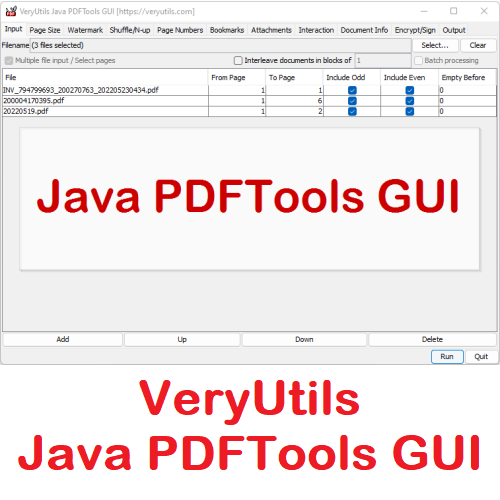
VeryUtils Java PDFTools GUI is a Java Swing application that can combine, split, rotate, reorder, watermark, encrypt, sign, and otherwise to process PDF files

 VeryUtils Java PDFTools GUI is a Java Swing application that can combine, split, rotate, reorder, watermark, encrypt, sign, and otherwise to process PDF files. You can use VeryUtils Java PDFTools GUI to make printable booklets from your PDFs, to add PDF bookmarks, effects (page transitions), to combine multiple PDF files, to watermark them, to rotate pages that do not fit, to attach files to your PDF, to encrypt and sign your PDFs, to change metadata (like author or keywords), and much more.

You can click following button to download the trial version of VeryUtils Java PDFTools GUI for evaluation,

https://veryutils.com/java-pdftools-gui


VeryUtils Java PDFTools GUI requires Java 5 or higher. You can download Java from Oracle ( http://www.java.com/ ).


The main window of VeryUtils Java PDFTools GUI is divided into multiple tabs. You can select options from as many tabs as you need. Press "Run" when you are finished setting options.


VeryUtils Java PDFTools GUI software has lots of PDF functions to merge, split, reorder, delete, encrypt, decrypt, rotate, crop and reformat PDF pages, you can use it to add information, header, footer and watermark, bookmarks, attachments, page numbers and more to PDF files.


VeryUtils Java PDFTools GUI software highlight features:

* Able to combine multiple PDF files into one PDF file.

* Support all pages and select a page range for processing.

* Reorder pages in PDF file.

* Support batch processing for more PDF files.

* Able to set owner password for input PDF file.

* Support reverse the page order in PDF file, use a From Page that is larger than the To Page.

* Able to select odd or even pages to processing.

* Able to Crop, Rotate, Remove, Scale Center PDF pages.

* Add two kinds of watermarks and page numbers, text watermark and PDF watermark.

* Support Shuffle/N-up PDF pages.

* Add chapter bookmarks to PDF file.

* Add attachments to PDF file.

* Remove attachments from PDF file.

* When a PDF file is shown in full screen mode, pages can flip automatically and/or with a nice effect.


Page Size Processing functions:

Crop to: This will crop the visible part of the PDF to one of the embedded page boxes (if present); Useful if you got a PDF intended for pre-press with visible crop marks and want to distribute it without showing the crop marks.


Rotate Pages: If you have a PDF that has both Portrait and Landscape pages, and your printer has problems in printing both, you can rotate the pages so that they are all Portrait or Landscape afterwards. Of course, you can use this option as well to rotate all pages.


Remove implicit page rotation: PDF knows two ways of rotating pages; rotating the content or rotating the media (implicitly) . Some tools have problems with rotated media, so you can change all Media rotations to content rotations with this option (The option above creates media rotation as well). jPDF Tweak should work with rotated media as well. If you have problem with rotated pages, try checking this option and, if it helps, report a bug.


Scale pages: Useful if your PDF contains pages of different size. Some tools (like the Shuffle tab of this tool) require pages of equal size. Use this option to scale all pages to the same size. Of course, you can use this option as well if all pages are of equal size. In that case, you might as well use the scale option of your PDF viewer program.


PostScript points: A PostScript point is the 72th of an inch.


Center instead of enlarging: Use this option if the new page size is larger than the old one and the pages should be centered instead of enlarged.


Do not preserve aspect ratio: Causes funnily stretched pages if the aspect ratio has changed.


The following table explains some functions which included in VeryUtils Java PDFTools GUI software:

* Merge: Merge or Combine two or more PDF files into a single PDF file.

* Split, Reorder or Delete: Split, Extract, Reorder or Delete PDF pages from a PDF file into a new file.

* Encrypt and Decrypt with Security Options: Encrypt or Decrypt PDF documents (Master Password or User Password may be required). Protect PDF files with passwords and prevent PDF files from being printed, copied, changed, filled, extracted, signed, assembled or merged. Supports Adobe Standard 40-bit Encryption and Adobe Advanced 128-bit Encryption

* Rotate and Crop: Rotate a PDF page by 0, 90, 180 and 270 degree. Crop a page to modify its layout of Print or View by specifying its margins.

* Reformat: Put multiple pages into one page to save paper and inks when printing hard copies. Add note lines for handout.

* Header and Footer: Add Headers and Footers to present information, such as date, time, page numbers, or the title of the document, in the top or bottom margins of a document.

* Watermark by Stylized Text: Add Stylized Text Stamp.

* Watermark by PDF Template: Add Stamp using PDF file.

* Add Information: Add information (title, author, subject, keywords, created, creator, producer, version) to PDF documents.


We are also provide customized development service based on this software, if you have any special requirements, please feel free to let us know, we will provide a solution to you asap.


VeryUtils HTML5 Excel is an Online Excel Application which written in JavaScript completely.

 VeryUtils HTML5 Excel is an Online Excel Application which written in JavaScript completely. VeryUtils HTML5 Excel is an online spreadsheet like MS Excel application that is powerful, simple to configure, and able to be embedded into your web and desktop applications easily.

https://veryutils.com/online-excel


VeryUtils HTML5 Excel is a Best JavaScript Data Grids and Spreadsheets for web and desktop developers. VeryUtils HTML5 Excel is a cloud based Excel Editor, you can use it to Open, View, Edit Excel Online easily. You can use this Online Excel Application to edit Excel files online from Windows, Mac OS, Linux, Android, iOS and anywhere.

If you want to implement following features programmatically, please feel free to contact us,

* Edit XLS, XLSX, XLSM, XLSB, ODS, CSV, TSV, HTML, HTM, MHT, MHTML

* Save to desired format: XLSX, PDF, HTML or original Excel format

* Advanced WYSIWYG Excel editor online

* Calculate formulas

* Set fonts & styles

* Render Charts & Shapes, Edit Comments

* Create an Excel file from templates or open Excel Spreadsheet to edit

* Open OpenDocument Spreadsheet to edit


Demo URLs:

* Open a black Excel Spreadsheet online,

https://veryutils.com/demo/online-excel/


* Open a CSV document online,

https://veryutils.com/demo/online-excel/?file=https://veryutils.com/demo/online-excel/samples/test.csv


* Open an Excel XLS document online,

https://veryutils.com/demo/online-excel/?file=https://veryutils.com/demo/online-excel/samples/test.xls


* Open an Excel XLSX document online,

https://veryutils.com/demo/online-excel/?file=https://veryutils.com/demo/online-excel/samples/test.xlsx


Online Excel Application Highlight Features:

* Edit from Anywhere. It works from all platforms including Windows, Mac, Android and iOS.

* All Excel files are processed in your local system, no files are sent to our servers, 100% protection of your sensitive documents.

* No plugin or software installation required for you.

* It's written entirely in JavaScript and runs entirely within your local web browser.

* Formatting: style, conditional formatting, text alignment and rotation, text truncation, overflow, automatic line wrapping, multiple data types, cell segmentation style

* Cells: drag and drop, fill handle, multiple selection, find and replace, location, merge cells, data verification

* Row & column: hide, insert, delete rows or columns, freeze, and split text

* Operation: undo, redo, copy, paste, cut, hot key, format painter, drag and drop selection

* Formulas & Functions: Built-in, remote and custom formulas

* Tables: filter, sort

* Enhanced functions: Pivot tables, charts, comments, cooperative editing, insert picture, matrix calculations, screenshots, copying to other formats, EXCEL import and export, etc.


Formatting

* Styling (Change font style, size, color, or apply effects)

* Conditional formatting (highlight interesting cells or ranges of cells, emphasize unusual values, and visualize data by using data bars, color scales, and icon sets that correspond to specific variations in the data)

* Align or rotate text

* Support text truncation, overflow, automatic line wrapping

* Data types

-- currency, percentages, decimals, dates

-- Custom (E.g ##,###0.00 , $1,234.56$##,###0.00_);[Red]($##,###0.00), _($* ##,###0.00_);_(...($* "-"_);_(@_), 08-05 PM 01:30MM-dd AM/PM hh:mm )

* Cell segmentation style (Alt+Enter line break, sub,super, in-cell style)


Cells

* Move cells by drag and dropping (Operate on selection)

* Fill handle (For a series like 1, 2, 3, 4, 5..., type 1 and 2 in the first two cells. For the series 2, 4, 6, 8..., type 2 and 4. Support arithmetic sequence, geometric sequence,date, week,chinese numbers)

* Auto Fill Options (Fill copy, sequence, only format, no format, day, month, year)

* Multiple selection (Hold Ctrl Selecting multiple cells, copy and paste)

* Find and replace (Such as a particular number or text string, Support regular expression, whole word, case sensitive)

* Location (Cells can be selected according to the data type)

* Merge cells

* Data validation (Checkbox, drop-down list, datePicker)


Row & columns

* Hide, Insert, Delete rows and columns

* Frozen rows and columns (First row, first column, Frozen to selection, freeze adjustment lever can be dragged)

* Split text (Split text into different columns with the Convert Text to Columns Wizard)


Operation

* Undo/Redo

* Copy/Paste/Cut (Copy from excel to VeryUtils HTML5 Excel with format, vice versa)

* Hot key (The operating experience is consistent with excel, if there are differences or missing, please feedback to us)

* Format Painter (Similar to google sheet)

* Selection by drag and dropping (Change the parameters of formula and chart through selection)


Formulas & functions

* Built-in formulas

-- Math (SUMIFS, AVERAGEIFS, SUMIF, SUM, etc.)

-- Text (CONCATENATE, REGEXMATCH, MID)

-- Date (DATEVALUE, DATEDIF, NOW, WEEKDAY, etc.)

-- Financial (PV, FV, IRR, NPV, etc.)

-- Logical (IF, AND, OR, IFERROR, etc.)

-- Lookup (VLOOKUP, HLOOkUP, INDIRECT, OFFSET, etc.)

-- Dynamic Array (Excel2019 new formulas, SORT,FILTER,UNIQUE,RANDARRAY,SEQUENCE)

* Array (={1,2,3,4,5,6}, Crtl+Shift+Enter)

* Remote formulas (DM_TEXT_TFIDF, DM_TEXT_TEXTRANK,DATA_CN_STOCK_CLOSE etc. Need remote interface, can realize complex calculation)

* Custom (Some formula suitable for use in China have been added. AGE_BY_IDCARD, SEX_BY_IDCARD, BIRTHDAY_BY_IDCARD, PROVINCE_BY_IDCARD, CITY_BY_IDCARD, etc. You can define any formula you want)


Tables

* Filters (Support color , numerical, date, text filtering)

* Sort (Sort multiple fields simultaneously)


Pivot table

* Arrange fields (Add fileds to rows, columns, values, area, it is similar to excel)

* Aggregation (Surport Sum,Count,CountA,CountUnique,Average,Max,Min,Median,Product,Stdev,Stdevp,Var,VarP etc.)

* Filter data (Add fileds to filters area and analyze the desired data )

* Drill down (Double click pivot table cell to drill down for detail data )

* Create a PivotChart (Pivot table can create a chart )


Chart

* Support types (Line, Column, Area, Bar, Pie, comming soon Scatter, Radar, Gauge, Funnel etc.)

* Chart Plugins (Link to another project ChartMix (opens new window)(MIT): ECharts is currently supported,Highcharts, Ali G2, amCharts, googleChart, chart.js are being developed gradually)

* Sparklines (Support by formula : Line, Pie, Box, Pie etc.)


Share

* Comments (Add, delete, update)

* Collaborate (Simultaneous editing by multiple users)


Insert object

* Insert picture (JPG,PNG,SVG and so on)


VeryUtils HTML5 Excel

* Matrix operation (Operate selection through the right-click menu: transpose, rotate, numerical calculation)

* Screenshot (Take a screenshot with selection)

* Copy to (In the right-click menu, copy selection to json, array etc.)

* EXCEL import/export


Keyboard shortcuts

CTRL + C -- Copy cell

CTRL + V -- Paste cell

CTRL + X -- Cut cell

CTRL + Z -- Undo

CTRL + Y -- Redo

CTRL + A -- Select all

CTRL + B -- Bold

CTRL + F -- Find

CTRL + H -- Replace

CTRL + I -- Italic

CTRL + UP/DOWN/LEFT/RIGHT -- Quickly adjust cell marquee

SHIFT + UP/DOWN/LEFT/RIGHT -- Adjust selection area

CTRL + Left mouse click -- Multiple selection cell

SHIFT + Left mouse click -- Adjust selection area

UP/DOWN/LEFT/RIGHT -- Move cell selection box

ENTER -- Edit cell

TAB -- Move cell selection box to the right

DELETE -- Clear cell data


VeryUtils PDF to HTML5 Form Filler for PHP does View, Fill, Submit PDF Forms Online

VeryUtils PDF to HTML5 Form Filler for PHP does View, Fill, Submit PDF Forms Online. PDF Form Filler for PHP API allows you to fill PDF Forms programmatically. PDF to HTML5 Form Conversion Tool. This tool makes it easy to convert your PDF forms and publish them to your owned server. Converted forms have the same look and feel as your PDF forms. No programming is required. VeryUtils PDF to HTML5 Form Filler SDK. PDF form filling using AcroForm is an important part of many workflows. It allows data entry directly on print ready media with ability to import, export, submit or email data for further processing. By running VeryUtils PDF to HTML5 Form Filler SDK on backend PDF Form can be populated with filled data, flattened or even signed.

https://veryutils.com/pdf-to-html5-form-filler-for-php


No compromises! Use your favorite browser to fill PDF Forms.

Automated PDF Form Filling in Web Browser

VeryPDF PDF Forms to HTML Forms conversion brings unique experience of form filling directly in the browser with full support of AcroForm technology including JavaScript support. This allows new level of PDF Form processing and workflows without need of having PDF Readers installed on computer or even on a mobile device.

Convert PDF Forms to HTML Forms

Converted HTML form contains Text fields, Dropdowns, List boxes, Radio buttons, Checkboxes and can be submitted like any other HTML form.

With unique support of document and form field JavaScript (ECMAScript for PDF), VeryUtils PDF to HTML5 Form Filler SDK produces ready-to-use HTML that enables PDF manipulation, form fields value formatting, calculations, validations or custom scripts known from the desktop PDF viewers.


PDF Form conversion to HTML using VeryUtils PDF to HTML5 Form Filler SDK allows adding JavaScript, CSS or other content directly into HTML to enrich form filling experience, additional content and functionality.


Extract data in an easily readable structured way

Automated web scraping services provide fast data acquirement in structured format. No matter if used for big data, data mining, artificial intelligence, machine learning or business intelligence applications. The scraped data come from various sources and forms. It can be websites, various databases, XML feeds and CSV, TXT or XLS file formats for example.


How to Convert PDF to Web Form?

Converting PDF to web form is very important if you want to upload the files online. Providing online content in PDF format with form is not a good idea because PDF tends to be messy in the background when posted online. So you can convert PDF to web form and make it user-friendly, responsive and accessible on any device. Unlike a PDF file that will only appear in a format that is typically designed for an 8.5x11 inch piece of paper, web content will automatically conform to the device that you are using, be it a tablet, desktop computer, mobile phone and so on.


With the VeryUtils PDF to HTML5 Form Filler SDK, we believe your web crawler can be programmed to access the PDF files and:

* Search Text inside PDFs – you can find and extract specific information

* Detect and Export Tables

* Extract Annotations

* Detect and Extract Related Images

* Use Regular Expression, Pattern Matching

* Detect and Scrape information from Charts

* more and more...


We believe that,

* Reading and navigating PDF's should be as easy as reading HTML.

* People want a streamlined and similar UX when viewing different content on different platforms.

* PDF should be as easy to use as jpg, txt or any other "simple" format on any application.

* Enriching your Application with PDF's should be easy and affordable.

* Different levels of complexity should be a matter of choice not a roadblock when implementing PDF solutions.


We want to show the world that it is possible to take advantage of all the amazing features that PDF has available without the headache of having to understand them yourself. We also believe that the content inside a PDF should be accessible to everyone and not seen to be locked away.


That's why we invented PDF Form Filler SDK

We build bridges, remove obstacles and introduce a unified framework for accessing PDF content. With over 20 years of experience working with PDF, we have introduced a completely new way of looking at PDF technology and letting you harness its full potential.


We built the VeryUtils PDF to HTML5 Form Filler SDK. It provides a platform to work with PDF overcoming the pain points that can arise with other content types and PDF manipulation applications. You decide whether you require accurate PDF rendering on any device, HTML5 conversion to embed into your application or extract paragraphs, tables, columns, images etc from within the PDF.


The VeryUtils PDF to HTML5 Form Filler SDK allows native text reflow, detects the logical reading order of the PDF and is Multi-platform, this means the same code base on any device and in any Programming language on any platform. You decide.


If you have any question for this VeryUtils PDF to HTML5 Form Filler SDK, please feel free to let us know, we are glad to assist you asap.


Tuesday, November 15, 2022

VeryUtils PDF to Word Converter SDK/CLI is a Royalty Free SDK for Developers

VeryUtils PDF to Word Converter SDK/CLI is a Royalty Free SDK for Developers. VeryUtils PDF to Word Converter SDK/CLI enables programmers and system administrators to seamlessly integrate powerful PDF to Word conversion functions into applications and server environments. VeryUtils PDF to Word Converter SDK allows software developers or professional users to batch convert PDF to Word documents silently, giving you simple but incredibly powerful PDF conversion capabilities and workflow solutions.

https://veryutils.com/pdf2word


You can integrate PDF to Word Conversion functions to your workflow or software, allowing your users to edit PDF contents, tables, text, or images as Word files. You can easily to integrate using C#, VB.NET, Java, PHP, Python. With VeryUtils PDF to Word Converter SDK software, you can convert and edit Adobe PDF Documents in MS Word easily, just convert PDF files to Word files, then you can modify text, font, bullet lists, tables, images and more in MS Word application.

VeryUtils PDF to Word Converter SDK/CLI supports Command Line operation. PDF to Word SDK can be used as a VeryUtils PDF to Word Converter Command Line Tool. The Command Line Tool enables users to easily automate PDF to Word conversion tasks. Users can convert specific page ranges, entire PDF files, or even multiple PDFs at once to one of three output formats: DOCX (Microsoft Word 2007 and later), RTF, and DOC.

VeryUtils PDF to Word Converter SDK/CLI offers different ways to integrate SDK into your projects using the native (C) or COM interfaces as well as .Net, Python, Java, C++, C proxy libraries.

VeryUtils PDF to Word Converter SDK/CLI features:

* PDF to Microsoft Word (DOC, DOCX, RTF).

* Use Command Line to batch convert PDF files to Word documents.

* Native support for batch conversions (bash, cmd, PS, sh).

* Output file format customization and precise formatting options.

* Specifying passwords for encrypted PDF files.

* Subset conversion: define page range for conversion.

* Scheduled conversion: automate PDF to Word conversion.

* Batch PDF Conversion: convert multiple PDF files to Word documents quickly.

* Three output formats: DOCX (Microsoft Word 2007 and later), RTF (rich text format), and DOC.

* Reconstruct Word and RTF documents from PDF files.

* Standalone software and don't require MS Word and Adobe Acrobat installed.

* Quick extract values from PDFs.

* Integrate PDF to Word conversion to your workflow or software easily.

* Edit PDF contents, tables, text, or images in MS Word application.

* Accurate PDF to Word conversion that preserves fonts, columns, tables, images, lists and page layouts.

* Directly convert PDF to Word without needing any MS Office software or third-party software.

* Multi-threaded conversion allows you to handle millions of document conversions.

* Able to integrate into server and web applications.

* Data mining PDF documents.

* Folder watchers.

* Populating databases from PDF.

* Publishing PDF documents in Word.

* Call the tool from script files with ease using the command line interface.

* Batch PDF Conversion: convert multiple PDF files in a directory path with a single command.

* PDF to Word SDK Licensing:

* The PDF to Word Conversion SDK is licensed as a Developer License and OEM Distribution Licenses.

A Developer License allows the deployment of the licensed software to one (1) client computer (for internal usage only). It does not include the right for access by concurrent users. A desktop computer is a computer that is designed for and is used by a single user.

To distribute the developed software outside your organization you will need an OEM License.

VeryUtils PDF to Word Converter SDK/CLI Programming Environments:

* Microsoft Visual C/C++/C#

* Borland Delphi

* VB.NET, VB6, VB Script

* Python, PHP, Java, JavaScript, J#

* more...

VeryUtils PDF to Word Converter SDK/CLI Hardware Minimum Requirements:

* x86 architecture CPU

* 512+ MB of free memory available

* 100+ MB of free storage space

VeryUtils PDF to Word Converter SDK/CLI Compatible Operating Systems:

* Windows 11, 10, 8.1, 8, 7 and later systems.

* Windows Server 2022, 2019, 2016, 2012 R2, 2012, 2008 R2, 32-bit or 64-bit edition and later systems.


🔐 VeryDRM: Protect One File or an Entire File Library

🔐 VeryDRM: Protect One File or an Entire File Library https://verydrm.com/ Businesses often need to protect important documents from unauth...